Mission control for the
One Person Studio

You're the whole team now — code, product, QA, all of it. dev-3.0 is the cockpit for commanding a fleet of AI coding agents at full speed, while one board keeps you focused. Without losing your mind.

Your projects, your boards, your agents — your flow.

Download View on GitHub
GitHub Stars
dev-3.0
Works with any terminal-based agent
Claude Code
Codex CLI
Gemini CLI
opencode
Any CLI tool
The Problem

AI agents are powerful.
Managing them is chaos.

You're running 5+ agents across different terminals, repos, and branches. Switching context takes forever. You lose track of what’s where. We tried every tool in the space — each had cool ideas, but something was always missing. So we built our own. The hard part was never typing code — it’s keeping your focus across all of it.

Terminal soup

Dozens of terminal tabs, each running a different agent in a different branch. Finding the right one is a nightmare.

Context switching tax

Every time you switch between agents, you waste minutes remembering where you left off and what each one is doing.

Branch conflicts

Multiple agents editing the same repo. Constant merge conflicts. No isolation between parallel workstreams.

How it works

Three layers of organization

Projects, tasks, and terminals — each layer gives you more control over your AI-powered workflow.

1

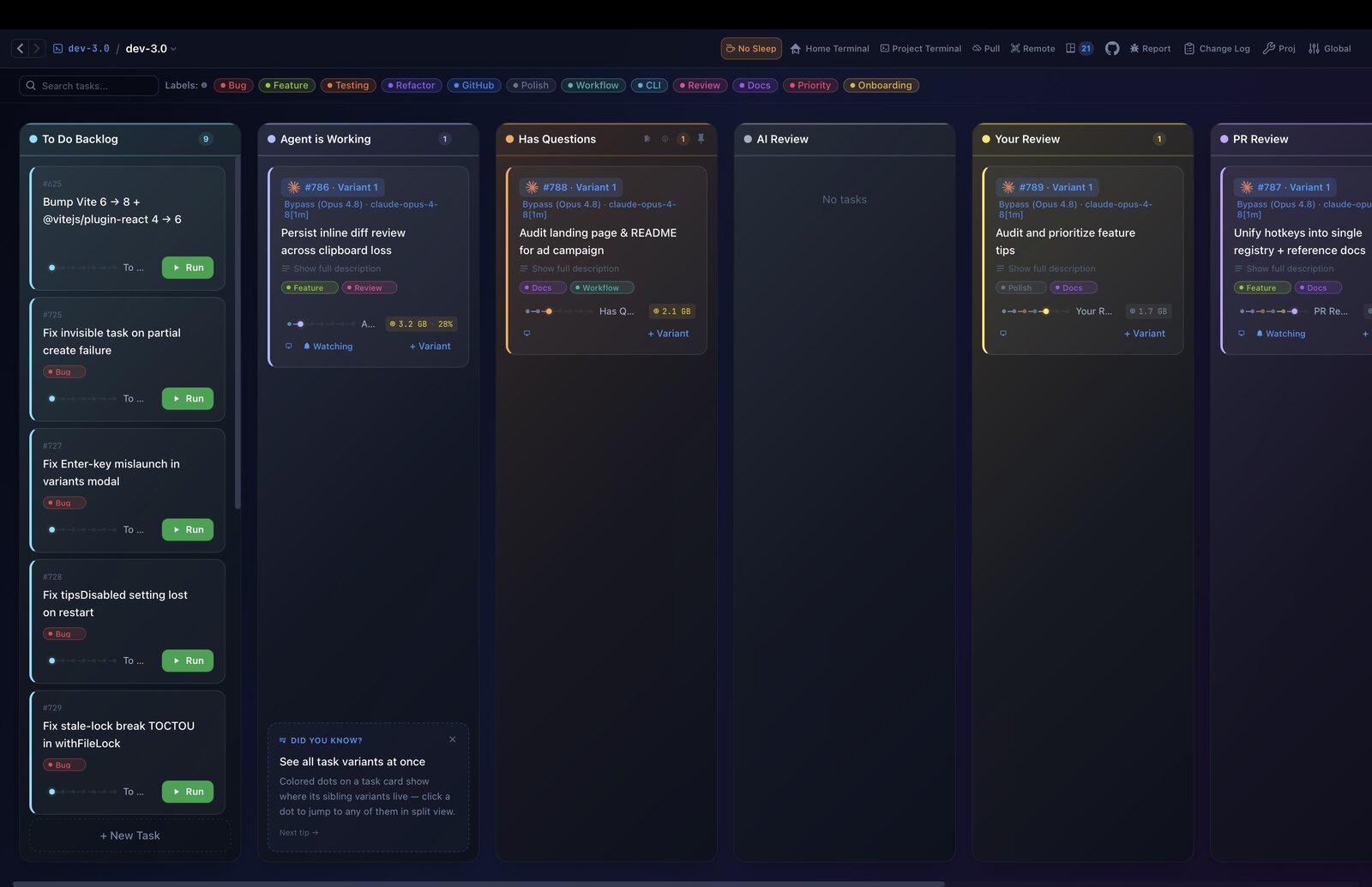
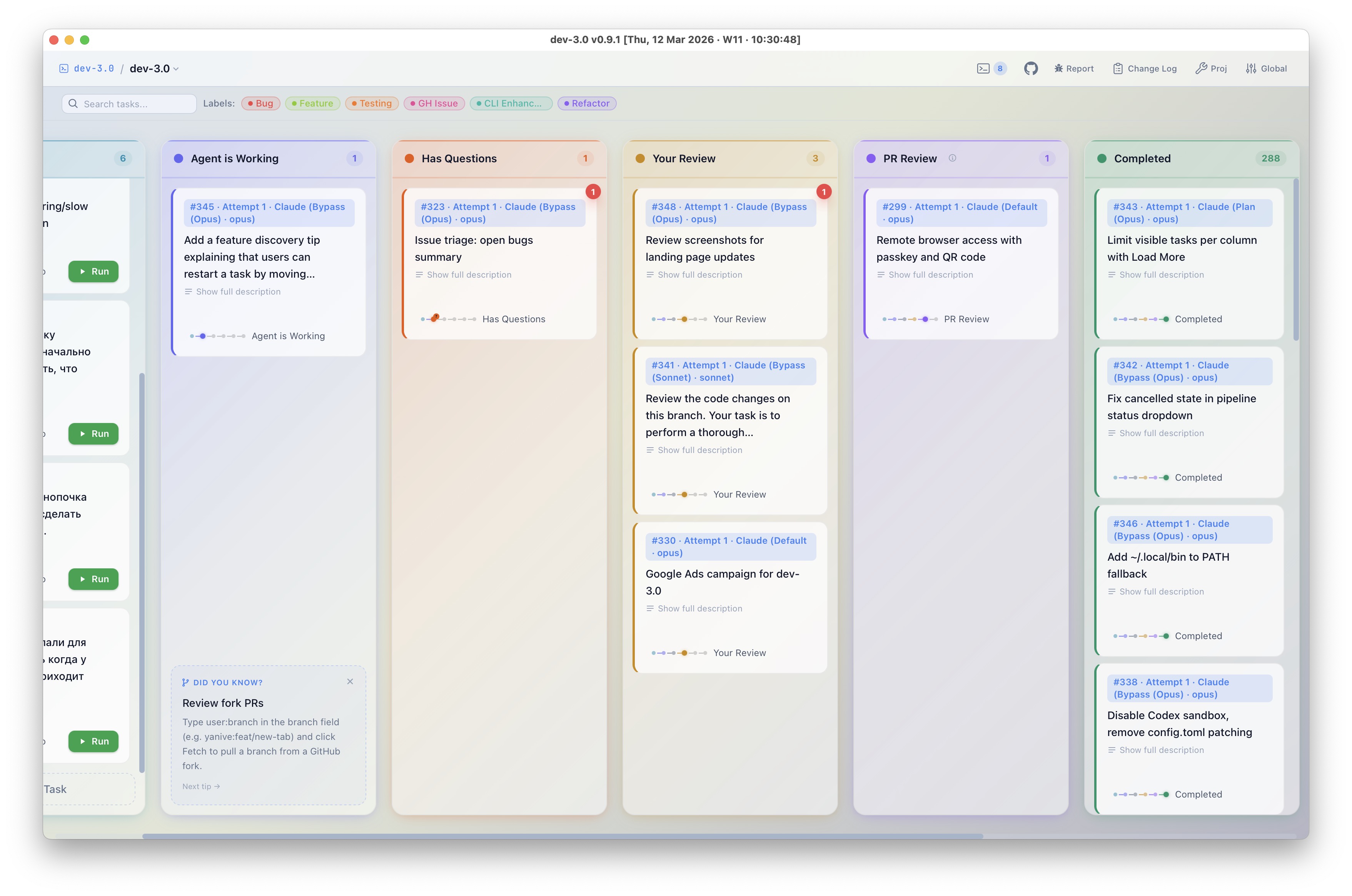
Organize work on a Kanban board

Create tasks, drag them between columns, and see at a glance what every agent is doing. Each task is a unit of work — a feature, a bugfix, a refactor. You stay in control of the big picture.

Kanban Board
Kanban board in light theme
2

Each task is an isolated git worktree

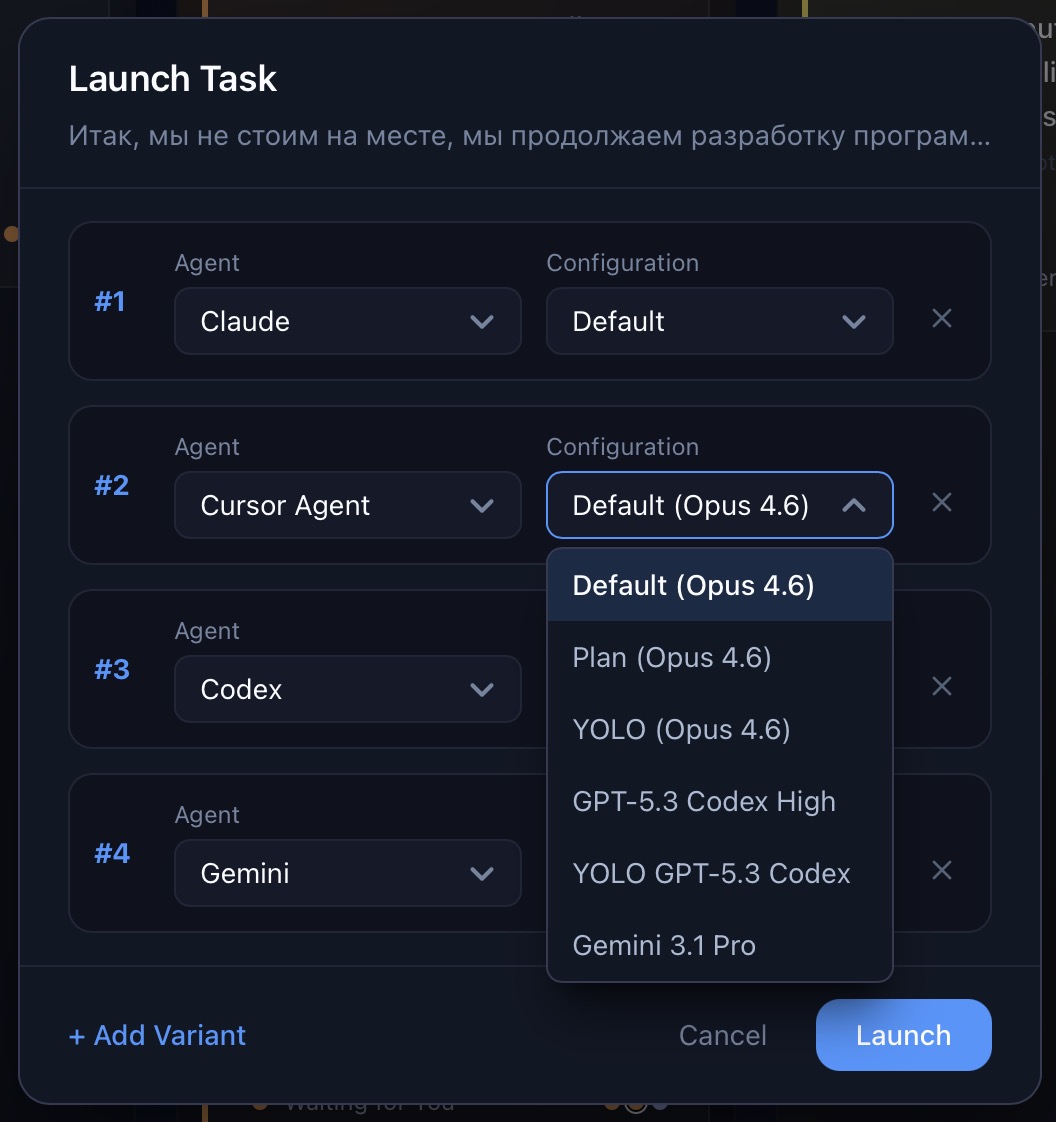
Every task on the board gets its own isolated git worktree. Inside that worktree you can run as many agents as you want — in parallel, same codebase, without stepping on each other’s toes. Claude, Cursor, Codex, Gemini — all at once on the same task if needed.

Launch Task — Multi-agent
Launch task with multiple AI agents
3

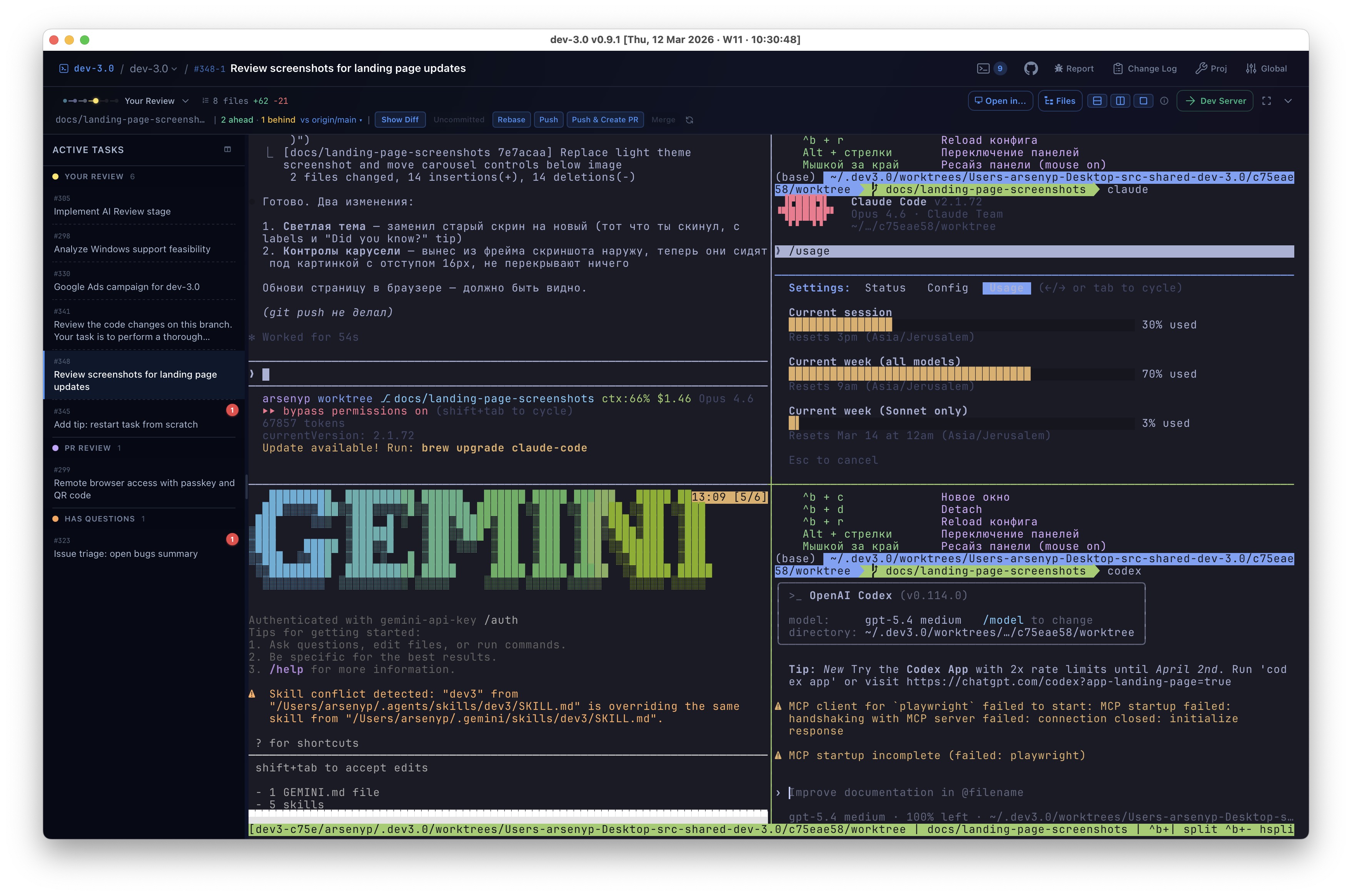
Full terminal — run multiple agents per task

Each task opens a real terminal powered by Ghostty’s rendering engine with tmux preconfigured. Split panes to run several agents side by side in the same worktree — Claude, Gemini, Codex, whatever you need. Scroll history, copy-paste, all native features intact.

Terminal — multiple agents in one task
Three AI agents running in parallel in split panes
Features

Built for the multi-agent era

Every feature is designed around one goal: managing many AI agents across many tasks without losing your mind.

Live terminal preview on hover

Hover over any task card on the Kanban board to see a live preview of its terminal — without switching views. Instantly check what each agent is doing. The preview updates in real-time, every second.

Git worktree per task

Full repo isolation. No merge conflicts between parallel agents. Each task works on its own branch and copy.

Tmux preconfigured

Each task launches with tmux and your preferred command. Split panes, persistent sessions, full terminal power.

Terminal bell alerts

Agents send a bell when they need your attention. Red badges appear on task cards so you never miss a prompt.

Drag-and-drop workflow

Move tasks between status columns with drag-and-drop. Visual feedback, smooth animations, intuitive flow.

Labels, branches & instant search

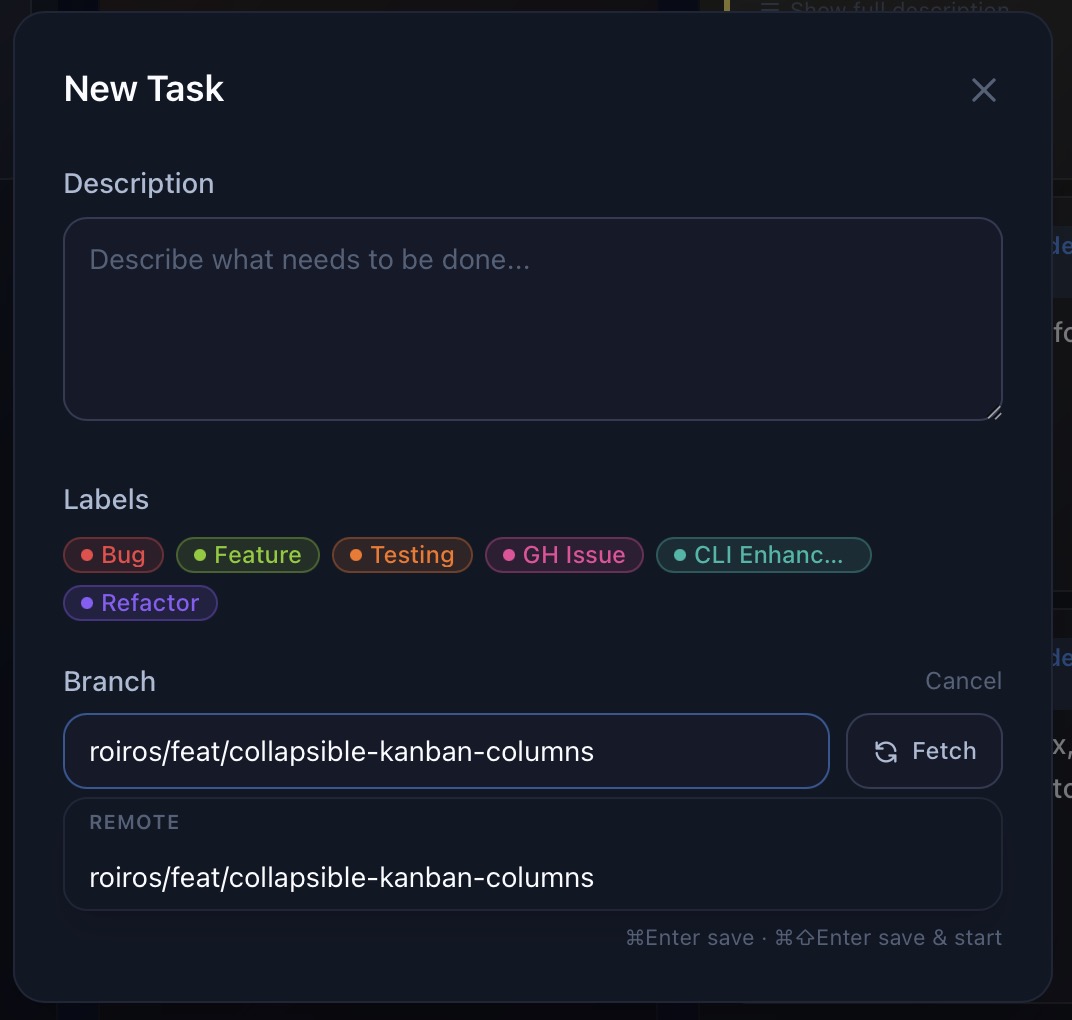
Organize tasks with colored labels (Bug, Feature, Refactor…) and find anything instantly with full-text search. Create tasks from remote branches — just paste a branch name, hit Fetch, and the agent starts working on it.

New Task modal with labels and branch fetch

One task, many attempts — pick the best

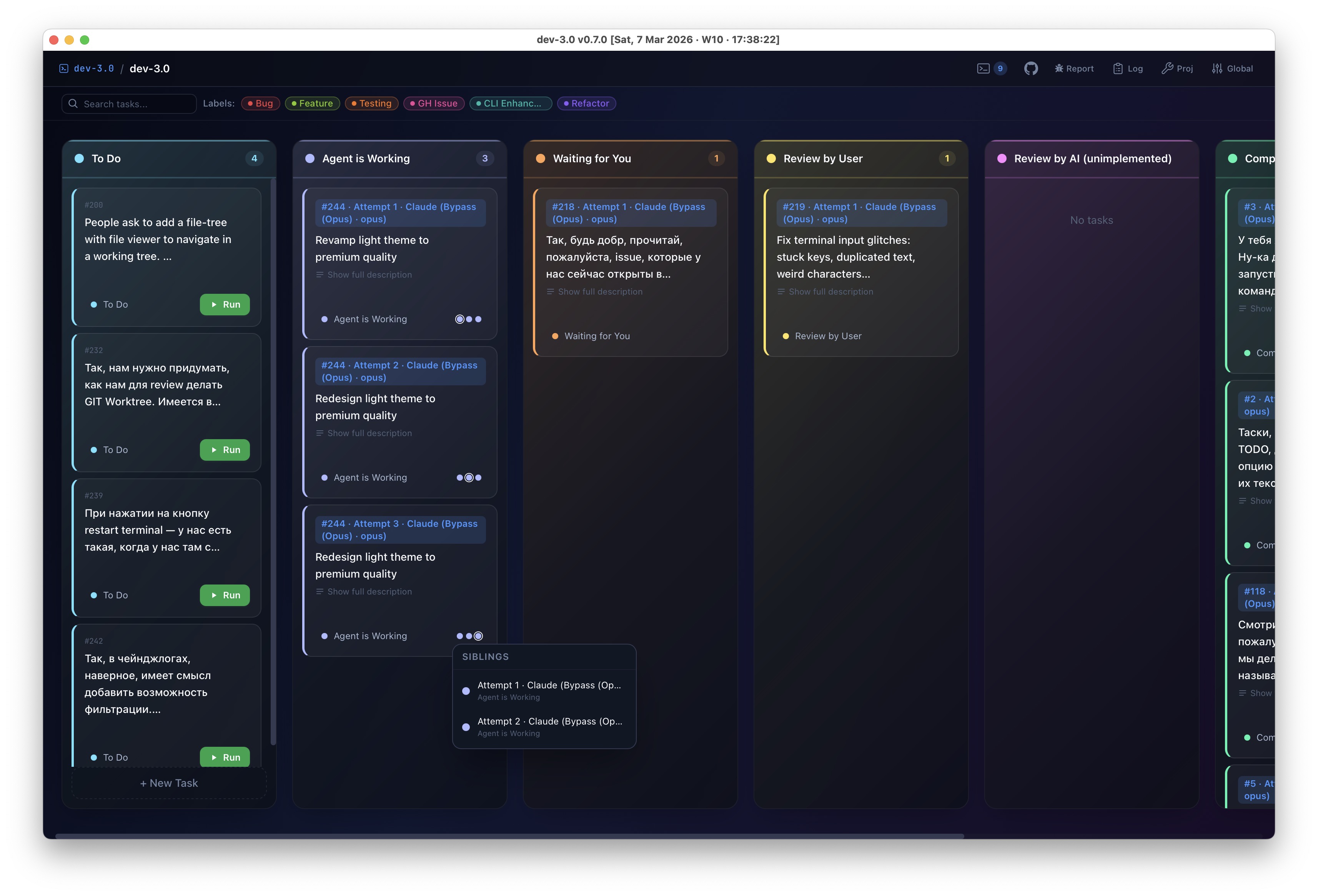
Don’t know exactly how something should look? Run the same task 3, 5, or 10 times — with different agents, models, or prompts. Each attempt gets its own isolated worktree. Browse the results, keep the winner, delete the rest.

One task with 3 parallel attempts running simultaneously

PR review mode

Check out any remote branch and toggle “PR review” to pre-fill a structured code-review prompt. The agent reviews — not modifies — the code.

Automated setup

Configure a setup script per project. Install deps, seed data, start services — runs automatically for each new task.

One-click dev server

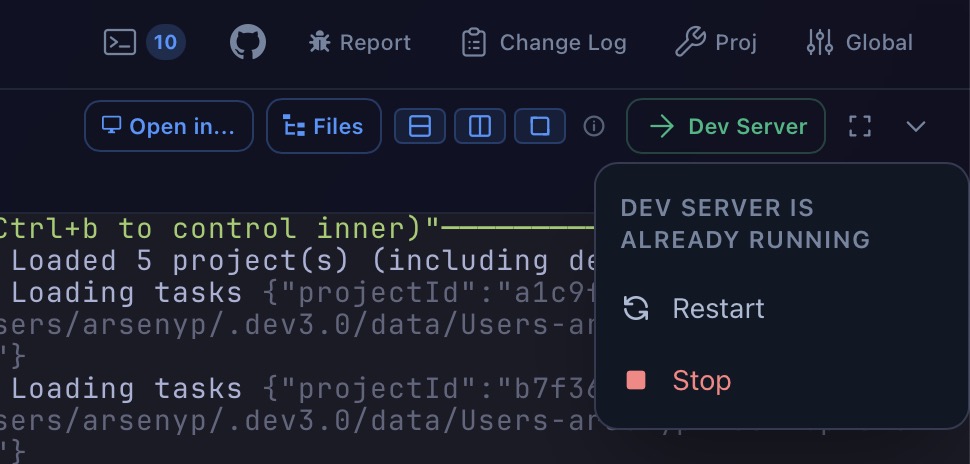
Launch your app straight from the task’s worktree with a single click. Restart or stop instantly — no terminal juggling. Configure the dev command per project and every task gets its own isolated server, ready in seconds.

Dev Server controls — launch, restart, stop in one click

Every shortcut in one panel

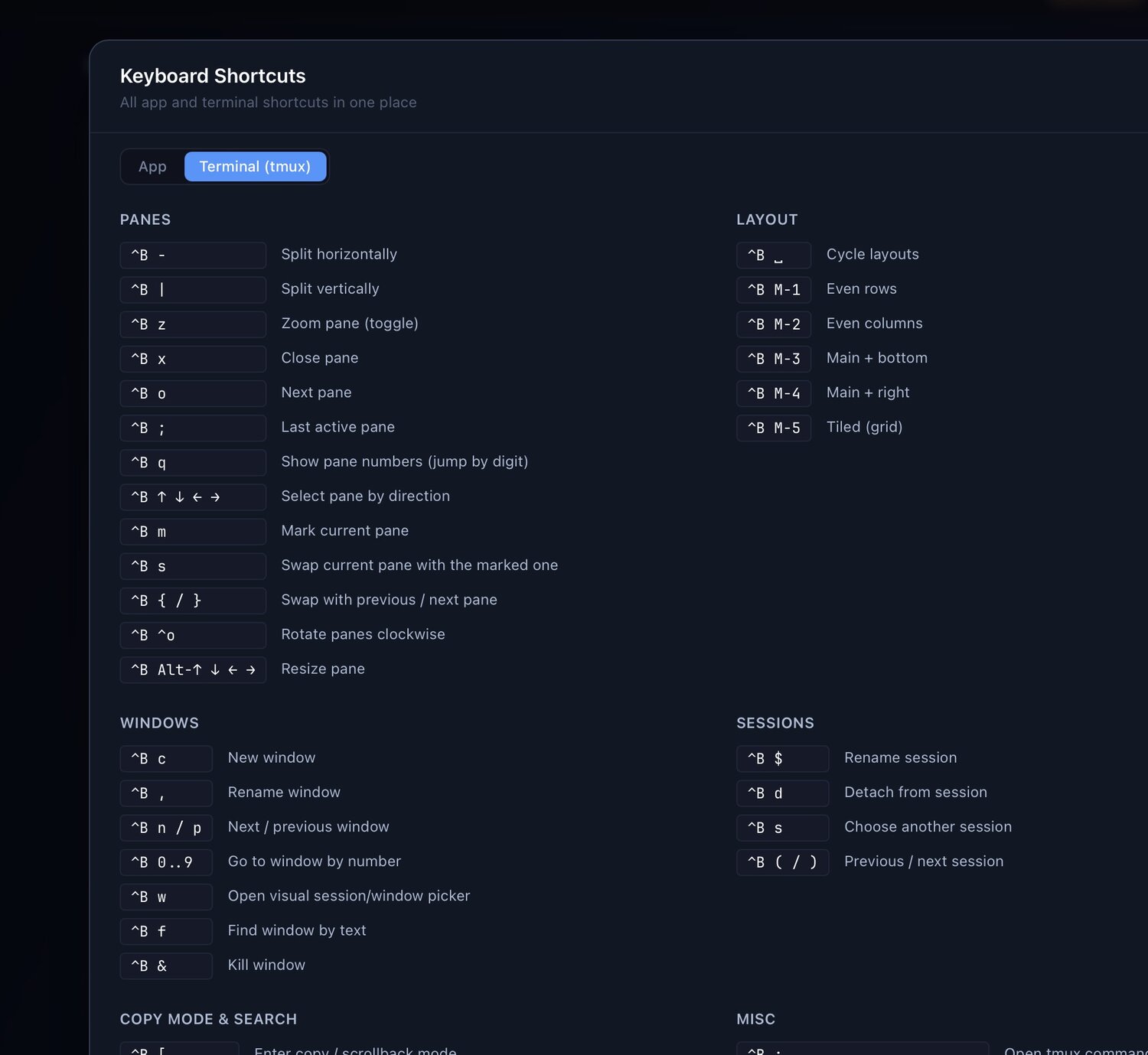
Hit ⌘/ to open a single reference for every keybinding — app navigation, quick-switch and zoom on the App tab, and the complete tmux keymap (panes, layouts, windows, sessions, copy mode) on the Terminal tab. Stop memorizing — just look it up.

Keyboard Shortcuts panel showing the tmux keymap — panes, layout, windows, sessions

Custom workflow columns

Define your own pipeline: AI Review, PR Review, On Hold — whatever stages your team needs. Move tasks through your custom flow with a click.

Dark & light themes

Full theme support. Switch between dark and light modes to match your environment and preference.

Copy-on-Write cloning

Clone node_modules, .venv, and other heavy directories into worktrees instantly with near-zero disk usage. Auto-detect finds well-known paths across 12+ ecosystems.

Auto-allocated ports

Set a port count per project and every task gets its own free ports, injected as $DEV3_PORT0, $DEV3_PORT1… into your scripts. No more port clashes between parallel dev servers.

A window per monitor

Press ⌘⇧N to open another dev-3.0 window and put a different project on each screen. Close any window without quitting the app.

Column agents

Give any column an agent that auto-spawns the moment a task lands in it — plus a per-column instruction telling the AI exactly when to move work there. Your board runs itself.

Automatic AI review

Completed tasks pass through a configurable AI reviewer before they reach you. Pick the review agent, model, and prompt — it catches bugs and fixes the small stuff first.

Monorepo file filter

Working in a giant monorepo? Sparse-checkout just the directories each task needs — worktrees create faster and use a fraction of the disk.

Philosophy

Built for you. Not your org chart.

AI writes the code now — your job is to command the fleet. The bottleneck moved from your editor to your focus. Two things we optimize for, above all.

Your speed — as one person

dev-3.0 optimizes a single developer: you. The unit is always the individual, never the org. Use it on a team if you like — but it’s not for managing other people; it’s for each person to command their own fleet at their own top speed.

Beautiful, and built around you

A cockpit you stare at all day should be fast, gorgeous, and keyboard-first — and bend to your way of working, not force one on you. Great tooling doesn’t just make you productive; it makes the work fun again. We sweat the polish.

And what we refuse: dev-3.0 is not an IDE — and won’t become one. Code and git are the agent’s job. Need an editor? One click to your real VS Code or Cursor — the goal is to need it less. Integrations? Your agent already speaks MCP to Linear, Jira and the rest. dev-3.0 is the cockpit; your agent is the adapter.

Community

Developers are noticing

Free, open source, and climbing. Join the developers who already command their agent fleets with dev-3.0 — and star the repo to keep the curve going.

Which is for you?

We didn’t build another editor.

Everyone else is building an editor for agents. We’re building mission control for you. Pick by your goal, not a feature checklist.

You want to live in the code

Hands on the editor and git, reviewing every line yourself? An agent IDE will feel like home.

You’re buying for a team

Need SSO, seats, audit logs and a managed platform? A team orchestrator fits better.

You’re a One Person Studio

AI writes the code; your job is running the fleet at full speed without drowning. That’s dev-3.0.

Get Started

Download. Open. Go.

dev-3.0 is a native app for macOS and Linux. The fastest way in: paste one line into the coding agent you already use — it installs everything for you.

🤖 Recommended — zero manual steps

Tell your coding agent to install it

Paste this into Claude Code, Codex, Gemini CLI — whatever you already run. The agent reads the guide, detects your OS, and does the whole install itself.

Install dev-3.0 by following the guide at https://dev3.h0x91b.com/ai-install.txt

Machine-readable docs: ai-install.txt · llms.txt

Or install manually

macOS

Homebrew — recommended
brew tap h0x91b/dev3 && brew trust h0x91b/dev3 && brew install --cask dev3

Apple Silicon & Intel. Prefer a classic install? Grab the DMG: Apple Silicon · Intel

Linux

Headless — any server
brew tap h0x91b/dev3 && brew trust h0x91b/dev3 && brew install h0x91b/dev3/dev3 dev3 remote

Prints a QR + URL — drive the full UI from any browser, even your phone. Desktop GUI via dev3 gui. No Homebrew? CLI tarball.

1

Paste the prompt

Your agent installs the app and its dependencies

2

Add a project

Point it at any git repo you already have

3

Create a task & go

Describe the work — your first agent is running

Download latest release

macOS (Apple Silicon & Intel) and Linux — Windows coming soon
Free & open source (Apache 2.0) • Upgrade anytime: brew trust h0x91b/dev3 && brew upgrade --cask dev3

Remote

Your fleet, from anywhere

dev-3.0 doesn’t need your laptop open. Run it headless on any Linux box and command your agents from wherever you are.

One command: dev3 remote

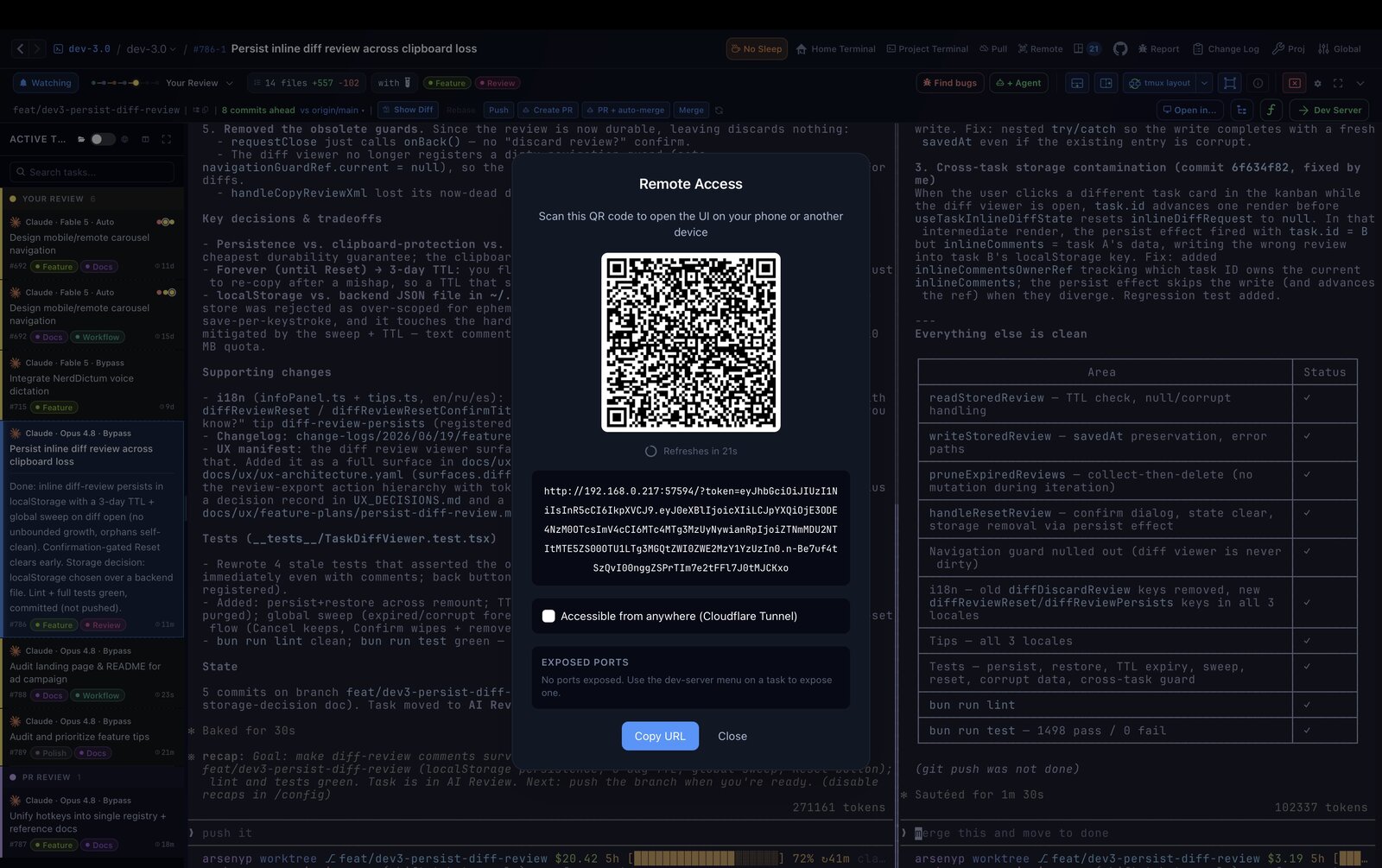
Start it on a cloud VM or home server — it prints a QR code and URL. Scan with your phone or open in any browser: the full UI, boards, live terminals, everything. A built-in Cloudflare tunnel means no SSH gymnastics, and agents keep working while you’re away. Check on the fleet from the couch, approve a review from the train.

Remote Access — QR login
Remote Access modal with a QR code to open the UI on a phone
Ways to work

One tool, your workflow

dev-3.0 doesn’t impose a flow. Size your tasks and arrange your space around how you actually work. A few of the ways people run it:

Solo at full speed

One task, one worktree; spin up many in parallel and let agents run to done. Size each task so you can verify it in ~90 seconds — if you can’t, it’s too big. AI review, one-click dev server and live preview make checking instant.

Research swarm

Barely writing code? Fan many tasks — each with several variants — at a question: measure, analyze, search. Then a roll-up task merges the findings, surfaces conflicts, and spawns the next round. A whole investigation, parallelized.

One big feature, many small steps

Branch off your own branch instead of main, then knock out small, isolated sub-tasks — each trivial to verify — that merge back up. The big branch assembles itself into your feature, with near-zero cognitive load per step.

…and more — multiple windows, multiple boards, many projects, many agents per task. Arrange it however fits you.

Compatibility

Your agent, your rules

dev-3.0 doesn’t integrate with agents — it hosts them. Any tool that runs in a terminal works out of the box. When agents ship new features — like Claude’s multi-agent teams — you get them instantly, no update needed.

Claude Code
OpenAI Codex
Gemini CLI
opencode
Cursor Agent
Any CLI…
Architecture

Native performance,
modern stack

Built on a native webview runtime, GPU-accelerated terminal, and the fastest JS runtime available. Instant startup, minimal memory footprint, and a silky-smooth experience.

Electrobun

Native macOS webview runtime. Lightweight, fast startup, tiny memory footprint.

Bun

All-in-one JS runtime. Fast installs, native APIs, built-in bundling. Main process runs in Bun.

Ghostty

GPU-accelerated terminal rendering engine. Buttery smooth, true-color, fast as native.

tmux

Battle-tested terminal multiplexer. Persistent sessions, split panes, keyboard-driven workflow.

Did you know?

Tips & tricks power users love

Dozens of small touches that add up. Here are a few favorites — the full list is one click away.

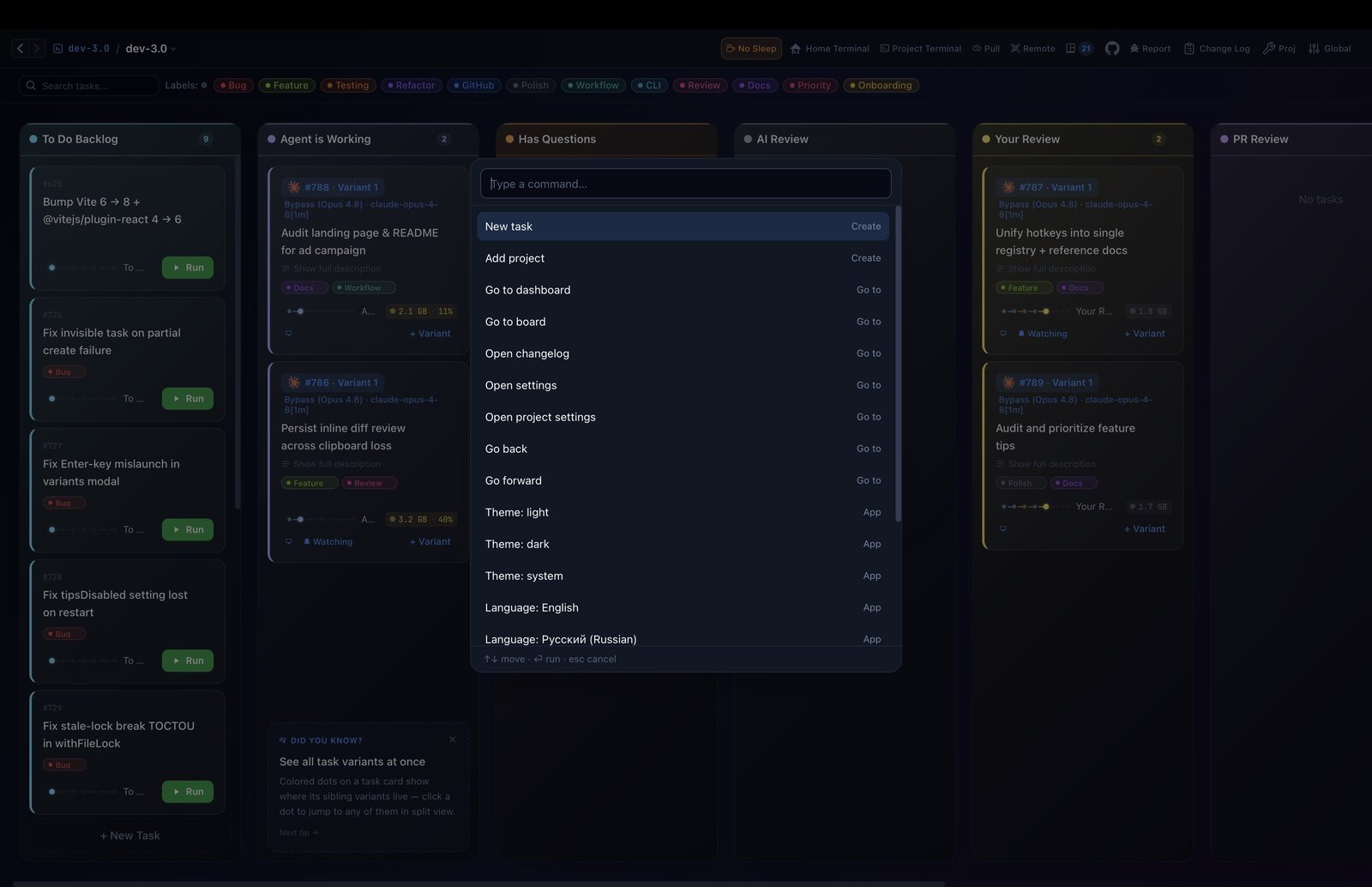
Run any command

Hit ⌘⇧P, type a few letters (theme, dev server, pull main…), Enter. Every action, no menus.

Explore solutions in parallel

Launch one TODO as several variants — each gets its own agent, worktree and terminal. Compare, keep the best.

Agents can create tasks

Just say “create a task in dev3 about…” in your prompt and it lands on your board.

Agents see your board

Mention “dev3” and the agent can list tasks, check statuses, and dig up past work.

Agents leave notes

Agents record key decisions and findings as task notes — context survives long after the worktree is gone.

Drag to AI review

Drop a task in the AI Review column and an agent reviews your branch, fixing the medium/high issues.

Paste a screenshot

⌘V or drag an image into a task or note — saved automatically and shown as a thumbnail.

Selections auto-copy

Select text in any terminal pane and it’s on your clipboard instantly — works over SSH too.

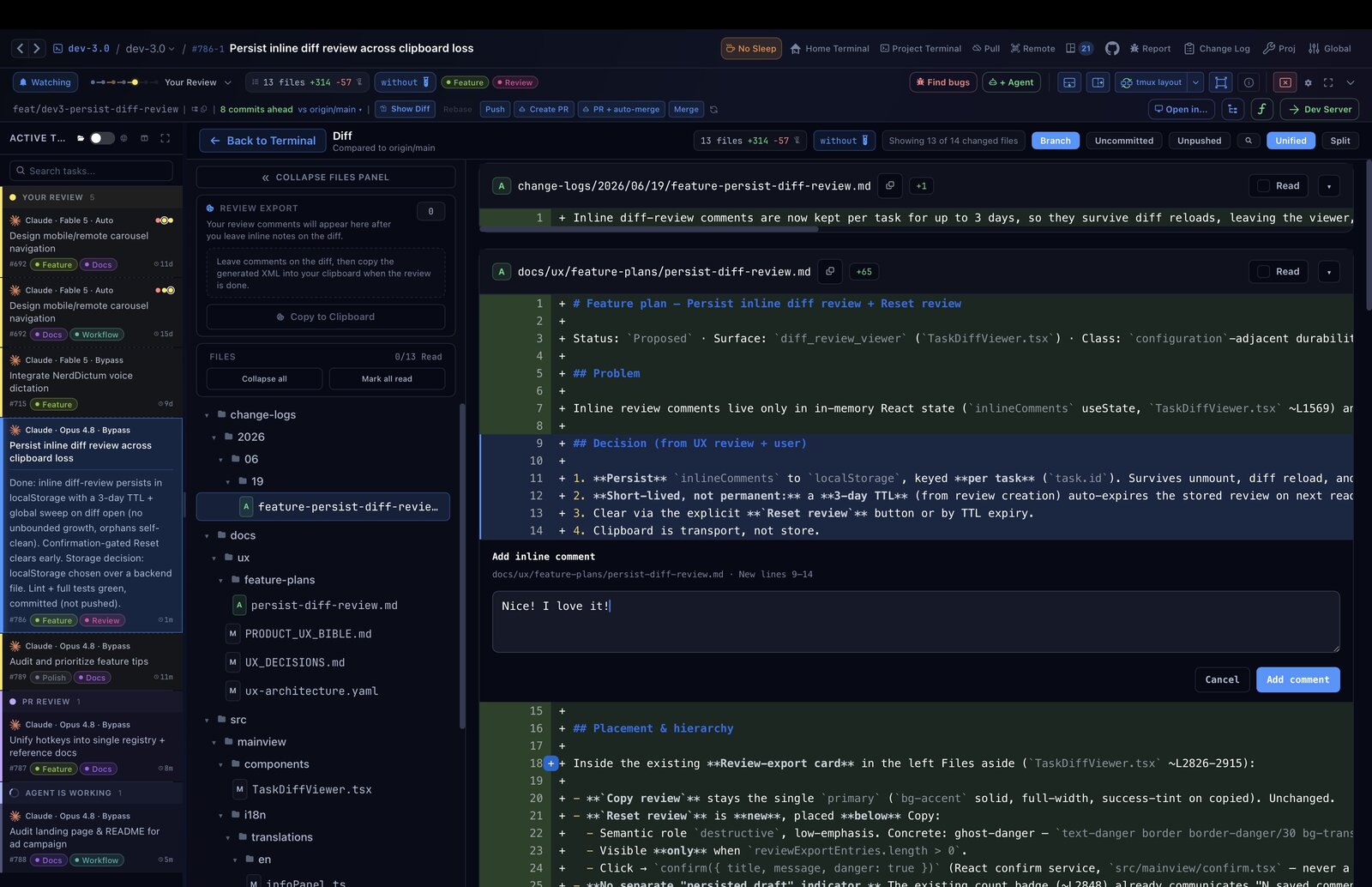
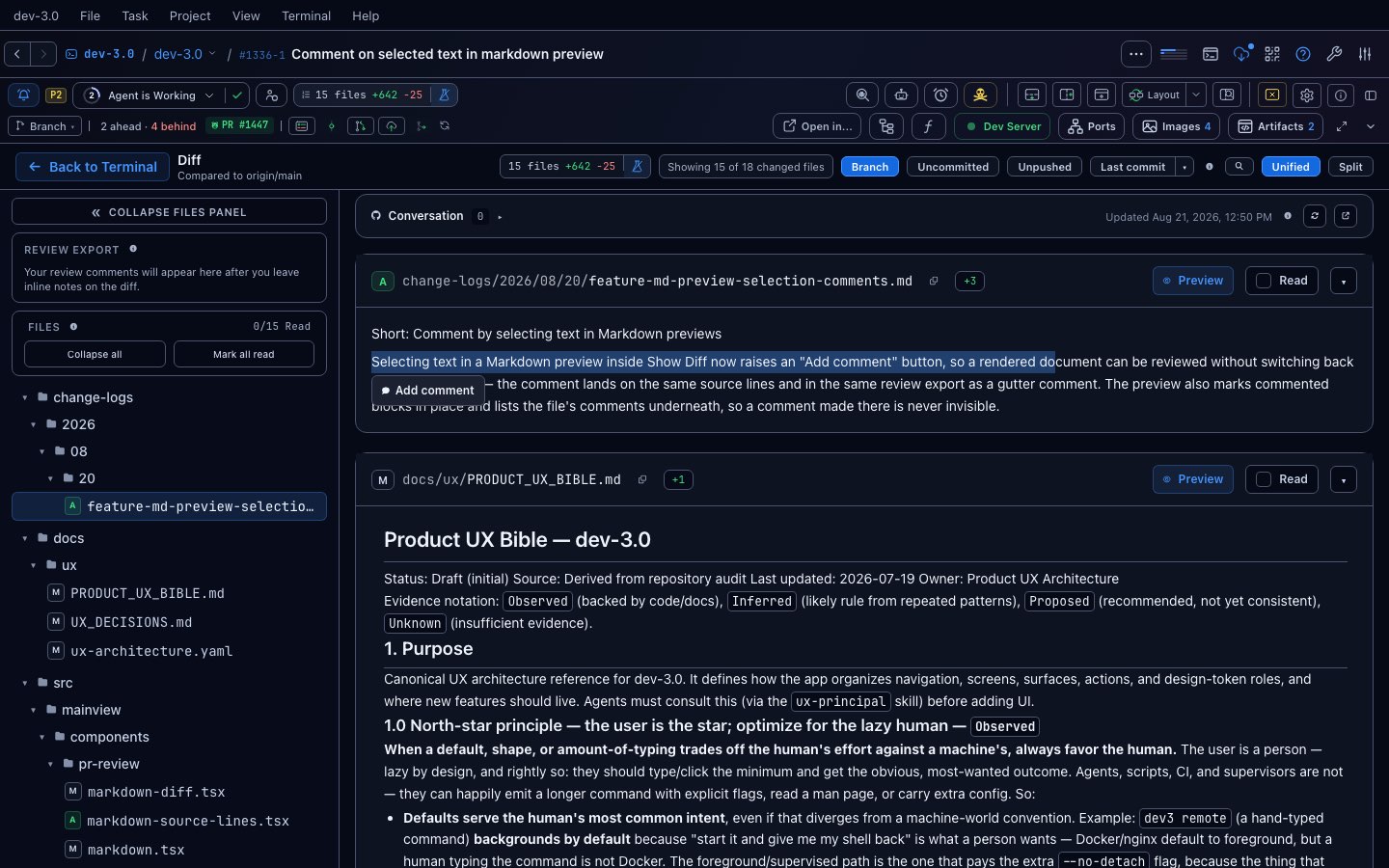
Comment on the diff

In Show Diff, click + next to any line to leave an inline note exactly where it matters.

Resume where you left off

Reopen a finished task and the previous AI conversation picks up instead of starting cold.

Option+Tab between tasks

Hold Option, tap Tab to flip through active tasks with live previews; add Shift to span every project.

Share config via git

Save scripts and paths to .dev3/config.json — teammates clone the repo and get the whole setup.

Show all 90+ tips
Terminal previewHover over an active task card to see a live preview of what's happening in the terminal.
Explore multiple solutions at onceWrite one TODO like "build a beautiful page X" and launch it multiple times — each variant gets its own agent, worktree, and terminal. Compare the results and pick the best one.
Instant worktree dependenciesdev3 can clone node_modules or .venv into each worktree using APFS copy-on-write, so setup takes seconds instead of minutes.
Manual AI ReviewDrag a task to the AI Review column to trigger an automated code review. The agent reviews your branch and fixes medium/high issues.
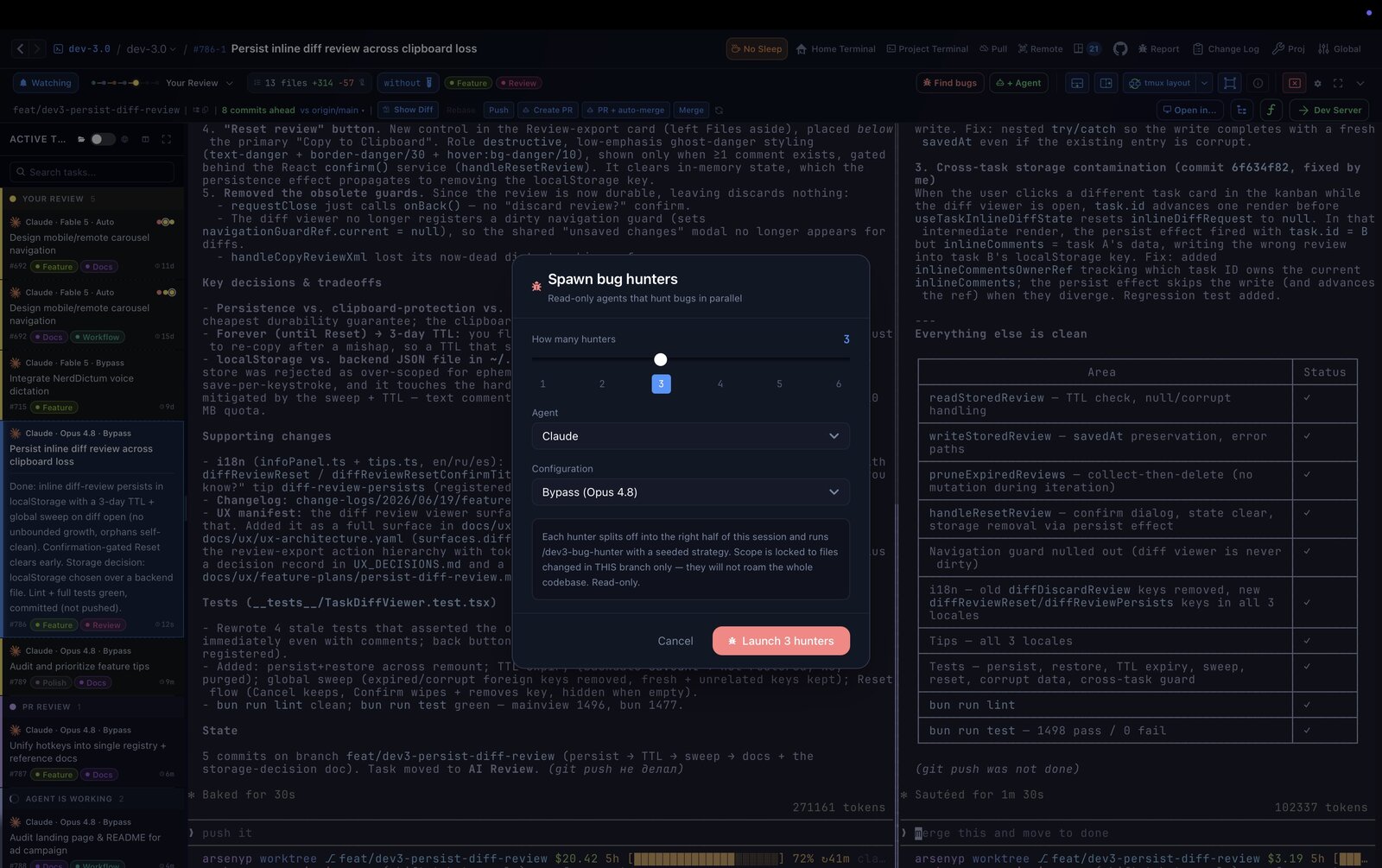
Spawn a swarm of bug huntersClick the red Find bugs button in the task header to open a lightbox — pick the count (default 3) and a swarm of read-only agents splits into the right pane, each running /dev3-bug-hunter with its own seeded strategy. They never edit code — after reporting, they ask before turning bugs into new tasks.
Run any commandPress Cmd/Ctrl+Shift+P, type part of a command (theme, dev server, pull main…), and hit Enter to run it.
Agents can create tasksJust say "create a task in dev3 about..." in your prompt and the agent will add it to your board.
Agents see your boardMention "dev3" in a prompt and the agent can list tasks, check statuses, and find past work.
Agents leave notesAgents record key decisions and findings as task notes. Check the Notes section in the task panel.
Let the agent open your PRClick "Create PR" and the agent in your task pane pushes the branch and opens a pull request with gh — no extra window.
Open a PR and auto-merge itClick "PR + auto-merge" to push, open the PR, and enable auto-merge so it lands as soon as checks pass.
Review your diff inlineClick "Show Diff" in the task panel to swap the terminal for an inline branch diff, then press Esc to jump back.
Comment right on the diffIn Show Diff, click the + button next to a line to leave an inline note exactly where it matters.
Copy your review as XMLThe sidebar builds an XML review block from your inline comments so you can paste it straight back into the agent chat.
Paste images into notesPress Cmd+V or drag an image into a task description or note — it's saved automatically and shown as a thumbnail.
Create custom board columnsGo to Project Settings to add columns with a name, color, and AI instruction so agents know when to move tasks there.
Drop files into terminalDrag any file onto the terminal and its full path will be typed into stdin automatically.
Create a PR review taskIn the Create Task modal, pick a branch and enable Review mode to pre-fill a structured code review prompt.
Auto-complete on PR mergeTasks in "Review by You" are checked every 60 s — when the branch is merged, a dialog offers to mark them complete.
Live port badges per taskRunning servers are detected automatically; click a port badge on any task card to open it in your browser.
Resume agent after restartWhen a terminal dies, "Resume Agent Session" restarts the agent with --continue so it picks up right where it left off.
Bell moves tasks automaticallyWhen the agent rings a terminal bell, the task moves to "User Questions" so you never miss a request for input. Click the bell in the sidebar to list every task waiting on you across all projects.
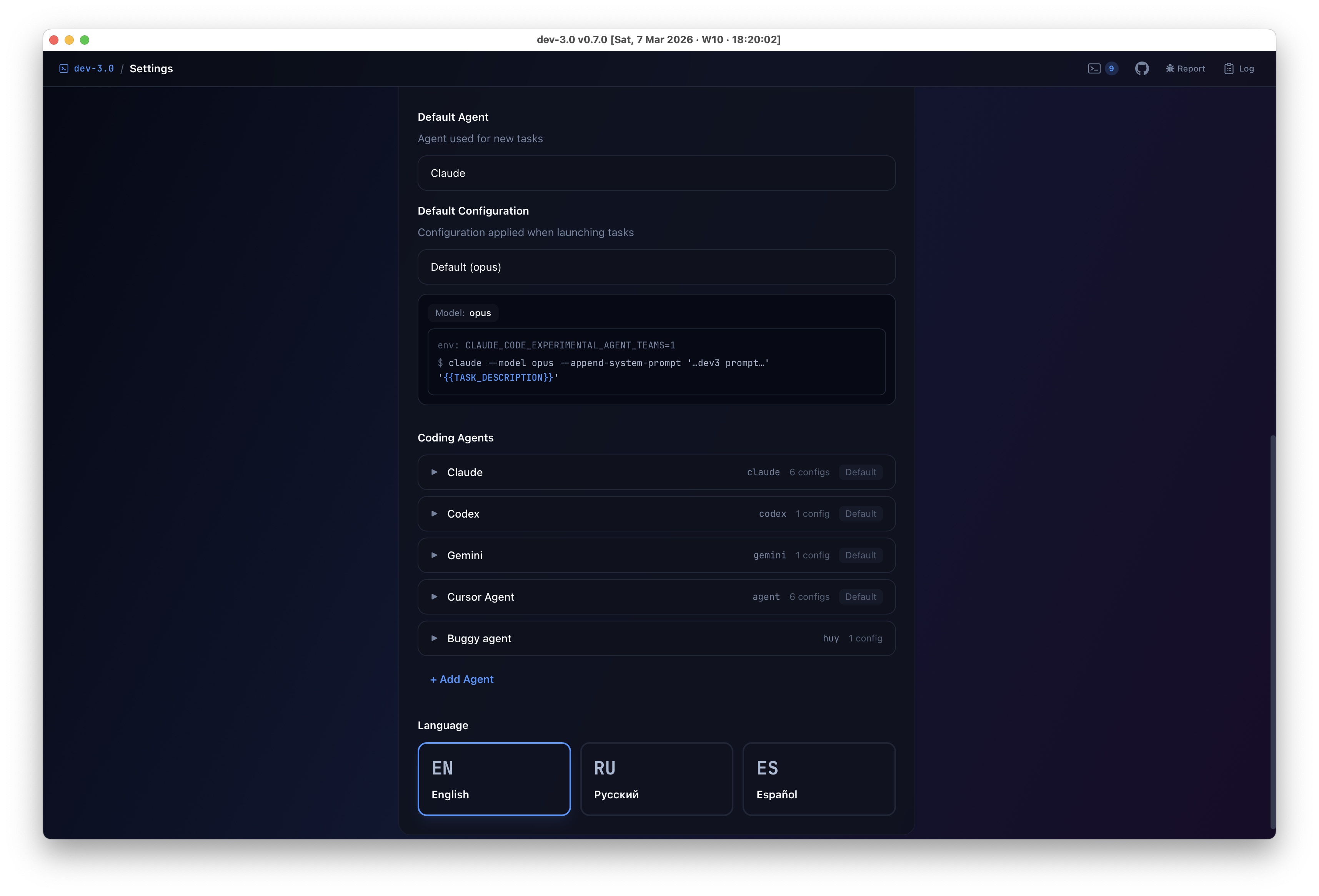
Pick your coding agentChoose Claude, Codex, Gemini, or a custom shell agent per project in Global Settings.
Terminal selections auto-copySelecting text in any terminal pane copies it to your system clipboard instantly — no Cmd+C needed.
Manage tasks from terminalRun `dev3` in any worktree to list, create, or update tasks — agents can use it too to manage their own work.
Your work is auto-snapshottedDev3 saves a git diff snapshot on every branch refresh so you can recover changes even if a worktree is wiped.
See all task variants at onceColored dots on a task card show where its sibling variants live — click a dot to jump to any of them in split view.
Reopen picks up where you left offReopening a completed or cancelled task resumes the previous AI conversation instead of starting fresh.
Run multiple agents on one taskNeed more hands? Spawn another agent in the same worktree — it opens a new tmux pane with a fresh agent session, no extra setup needed.
Share project config via gitUse "Save to Repo" in Project Settings to store scripts and paths in .dev3/config.json — teammates get the setup automatically.
Column agentsAny custom column can auto-spawn an agent when a task enters it. Configure agent and prompt in Project Settings.
Auto-allocate portsSet portCount in Project Settings to auto-assign free ports per task. Use $DEV3_PORT0, $DEV3_PORT1 in scripts.
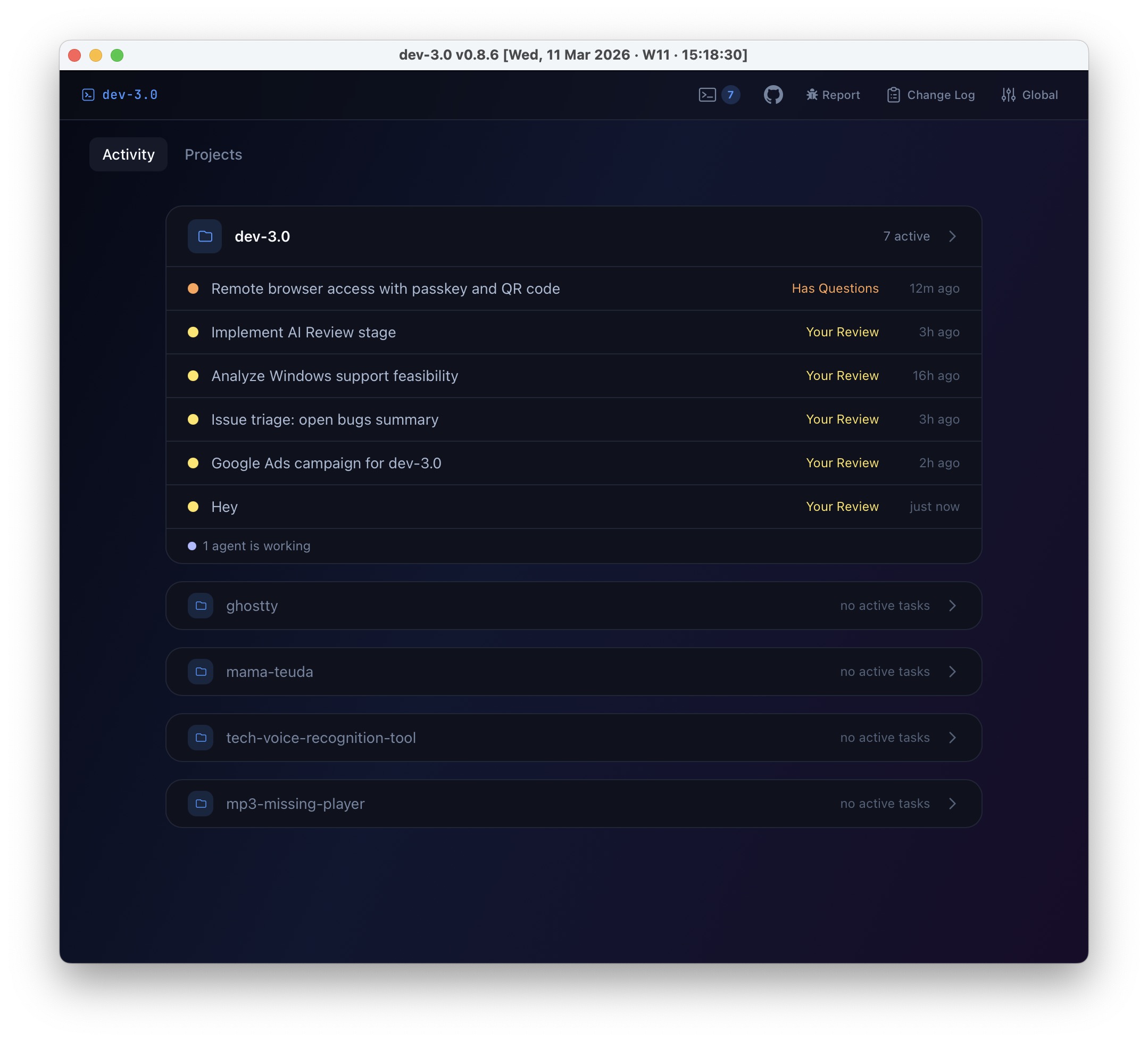
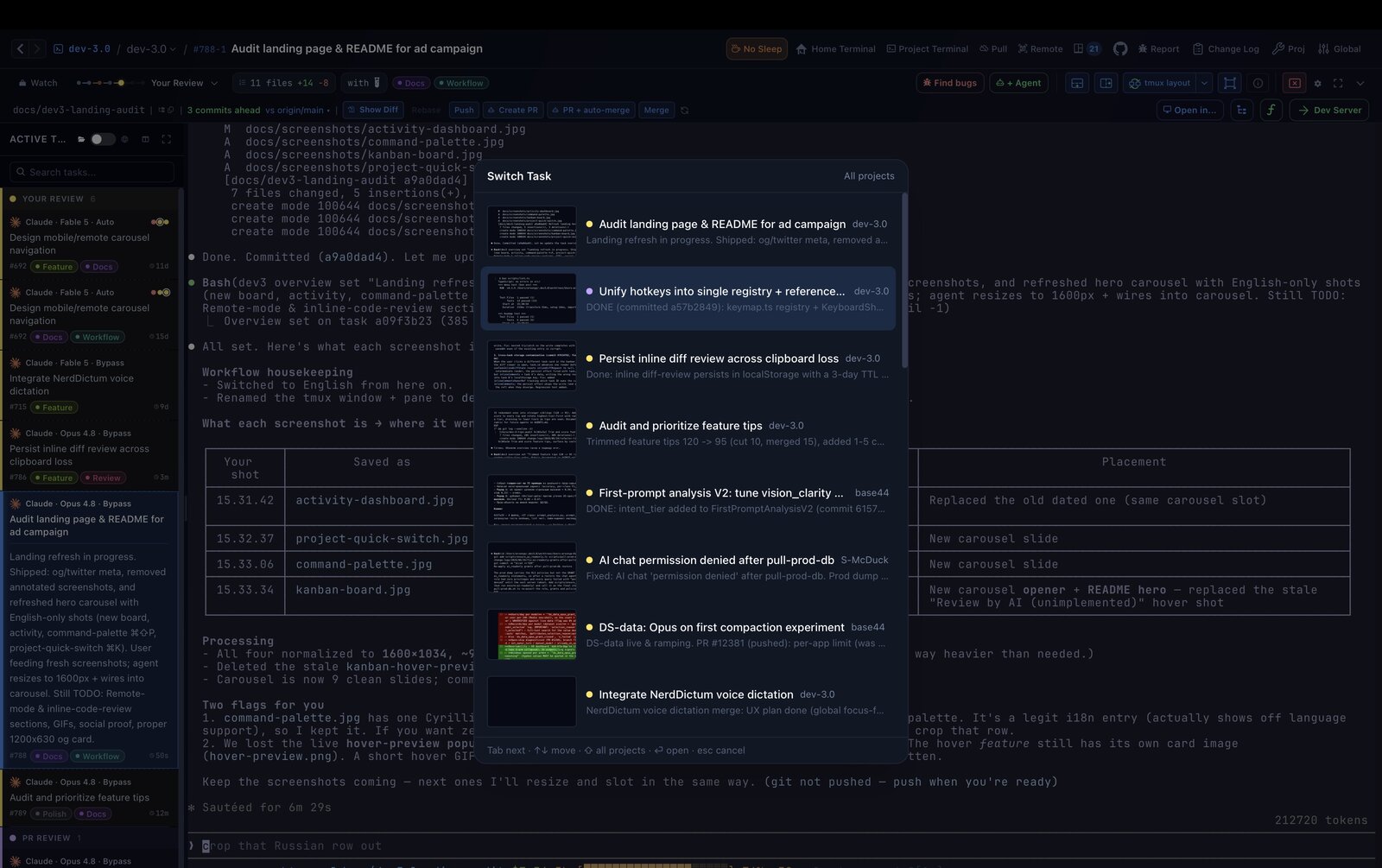
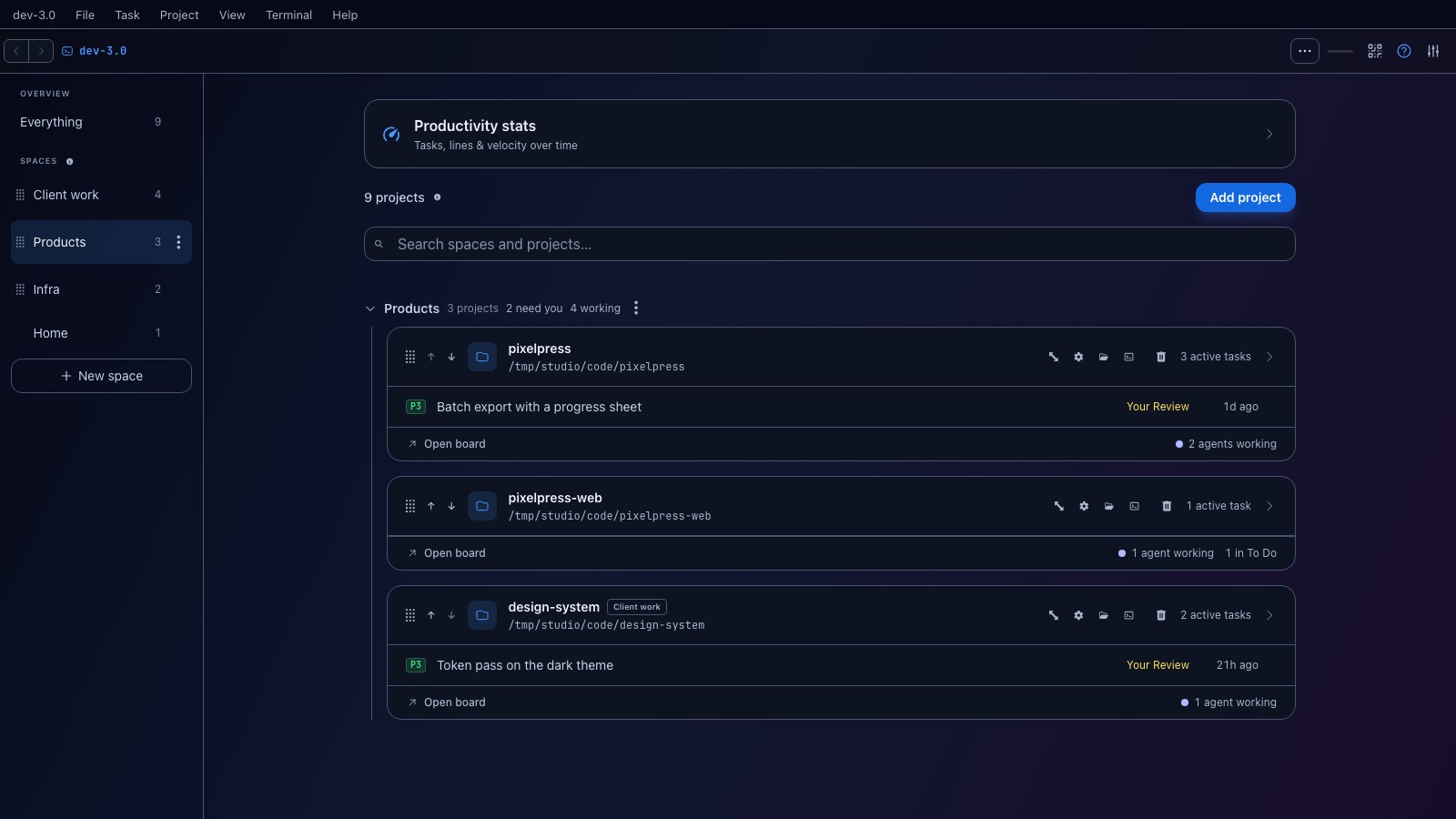
See tasks from every projectFlip the toggle next to Active Tasks to switch between this project only and every active task in dev-3.0 — click any card to jump straight into its project.
Just need a terminal?Click Scratch Task in the New Task modal to spin up a worktree + agent with no prompt — the agent greets you and renames the task itself once you say what you need.
Spread projects across screensPress Cmd+Shift+N (or File → New Window) to open another dev-3.0 window. Put a different project on each monitor and close any window without quitting the app.
Autocomplete agent skills with /Type / in a new task's description to pick an installed agent skill from the suggestion list.
Option+Tab between tasksHold Option and tap Tab to flip through active tasks; release to jump. Arrows ↑↓ move both ways. (Ctrl+Tab on Linux.) Add Shift (Option+Shift+Tab) to switch across all projects.
Paste big logs as filesPaste a large text block and it's saved as a .txt attachment, keeping the task light instead of bloated.
How long since the moveEach Active Tasks card shows a live age badge (5m, 7h, 13d) — hover it for the exact status-change time.
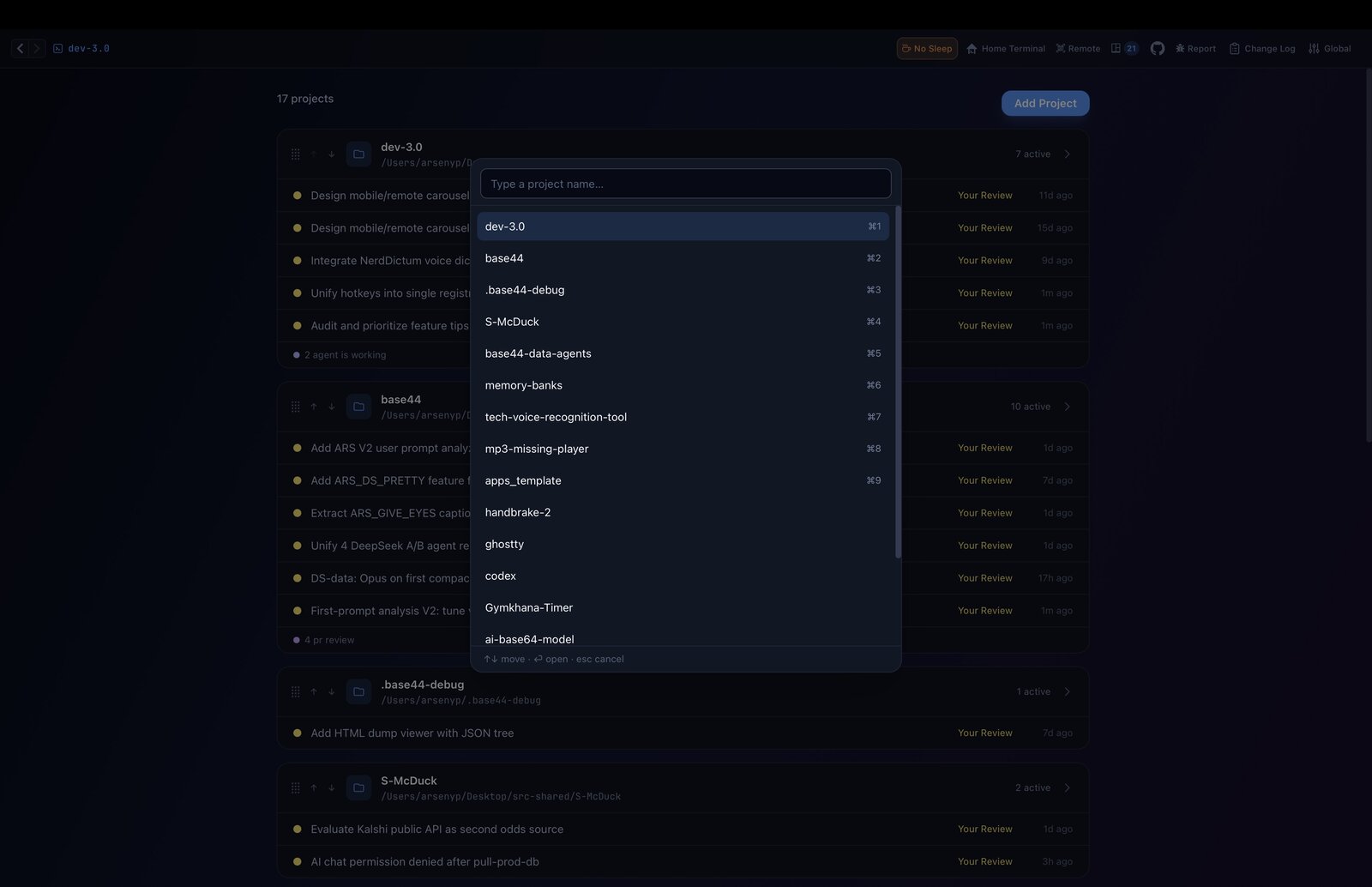
Switch projects, keep your viewPress Cmd/Ctrl+1..9 from a task view to jump to another project without leaving the task view — pick a task on the left to open its terminal. Add Shift to flip to the opposite view (board ⇄ task view).
Jump to a project by namePress Cmd/Ctrl+K, start typing a project name, and hit Enter to jump to the best match — no need to remember its number.
Quick task creationDouble-click empty space in the To Do column to instantly open the new task form.
Open in your editorRight-click any active task card to open its worktree in Finder, VS Code, Cursor, or other apps.
Task overview on hoverHover any active task to see its overview above the terminal. Click the pencil to edit a one-paragraph summary inline — perfect for re-entering focus after a break.
Write your own overviewClick the pencil on an overview and save your own version — it overrides whatever the agent writes. Hit the undo icon next to it to switch back to the agent's summary.
Search tasks everywherePress Ctrl/Cmd+F to search on the board and sidebar by name, #ID, PR number, or description.
PR number on every cardTask cards show a clickable PR badge when an open pull request exists — click it to jump to GitHub.
Hide tests from the diffUncheck "Include tests" in the diff toolbar (or task top bar) to hide test files and see only production-code changes in the +/− totals.
Comment on a range of linesClick a line number in the diff gutter and drag to select a range, then comment on all of it at once.
Inspect unpushed commitsClick "Unpushed" in the task panel to review committed work that is still only on your machine.
Clone repos directlyClick "Add Project", choose "Clone from URL", and paste a git URL — the app clones and adds it for you.
Full board in split viewWhen you open a task, a compact sidebar shows by default. Switch to the full scrollable Kanban board on the left for the complete picture.
Browse files with yaziClick the Files button in the task header to open a yazi pane for quick worktree navigation.
Split terminal with one clickThe horizontal split, vertical split, and zoom buttons in the task panel send tmux commands directly to your active session.
Branch sync at a glanceThe task info panel shows how many commits your branch is ahead or behind the base branch, so you know when it's time to rebase.
Safe task completion checksBefore destroying a worktree, dev3 warns you about uncommitted changes, unpushed commits, and unmerged branches.
See every shortcutPress ⌘/ (or Ctrl+/) — or open Help → Keyboard Shortcuts — to view all app and terminal shortcuts in one panel.
Track your tmux sessionsThe header badge shows active dev3 tmux sessions — click it to attach, copy commands, or force-kill stale sessions.
Run dev serversUse `dev3 dev-server start` in a worktree to launch its dev server, then stop or restart it from the terminal.
Start tasks from any branchIn the Create Task modal, pick an existing local or remote branch instead of always starting from scratch.
Review fork PRsType user:branch in the branch field (e.g. yanive:feat/new-tab) and click Fetch to pull a branch from a GitHub fork.
Restart a task from scratchMove a task to Cancelled, then back to Todo — it gets a fresh worktree and a clean agent session.
Shell stays after agent exitsWhen your agent exits (/exit), you stay in a live shell in the worktree. Run commands, switch agents, or type exit to finish.
Filter worktree filesIn Project Settings, toggle off "Include All Files" to check out only the directories you need — great for large monorepos.
Customize AI ReviewChange the review prompt or toggle automatic AI Review in Project Settings. Works per-project.
Per-task settingsEach worktree can have its own .dev3/config.json. Click the gear icon in the task panel to edit it.
Project TerminalNeed a quick shell at the repo root? Click the Terminal button in the header or press ⌘` to toggle it from any project screen. ⌘⇧` opens a separate home-directory shell.
Resource usage per taskEach active task shows CPU and memory — hover the badge on the card for details.
Watch tasksClick the bell on a task card to get notified when its status changes. Click the notification to jump straight to that task.
Keep the machine awakeThe amber coffee toggle next to Quick Shell stops the computer sleeping while dev-3.0 is open. It's on by default and forced on whenever remote access is active.
Pull main without the terminalThe Git Pull button next to Project Terminal in the top header runs git pull on the project's main worktree — enabled only when it's on main or master. A blue dot on it means origin has new commits to pull.
Start a project from scratchAdd Project → New lets you pick an empty folder; dev-3.0 runs git init, writes .dev3/README.md, and makes the first commit for you.
Your review notes are safeIf you press Esc, click Back, or follow a breadcrumb while you have inline diff comments, dev-3.0 asks before discarding them — and the Save button there copies the review XML to your clipboard so you can paste it into the agent chat.
Add multiple repos at onceIn Add Project → Local Folder, Cmd-click or Shift-click to pick multiple repos and add them all in one step.
Project list is backed up dailyLost your projects? Restore from ~/.dev3.0/projects-YYYY-MM-DD.json.bak — snapshots are kept for 7 days.
Agents can request completionWhen an agent runs `dev3 task move --status completed`, you get an approval dialog — approve to complete or keep the session alive.
Create labels while adding a taskIn the New Task dialog, hit "+ Add Label" to create and assign a brand-new label without leaving the form.
Jump back and forwardUse the ‹ › arrows top-left, ⌘[ / ⌘], or your mouse side buttons to retrace where you've been.
Keyboard shortcutPress ⌘N anywhere to create a new task without touching the mouse.
Label and filter tasksAdd colored labels to task cards and use the filter bar above the board to show only matching tasks.
Pick gh per projectOpen Project Settings and choose the gh account for that repo before creating PRs or checking PR status.
Pick your diff layoutShow Diff now defaults to Auto — Unified on laptop screens, Side by side on big monitors. Override it in Global Settings if you want it pinned.
Zoom the whole UIPress ⌘= / ⌘- to zoom in and out; the terminal font scales independently and the level is saved across sessions.
Expand task details inlineClick the arrow button to the right of the zoom controls to expand the task info bar with description, worktree path, and timestamps.
Setup can block startupIn Project Config -> Setup Script, choose whether the agent launches immediately or waits for setup to finish.
Rename any taskTask titles are auto-generated from the first words of the description so you don't fill two fields. But you can always click the title to set a custom name.
Double-check branch startWhen the current branch is auto-filled in the task picker, Save warns before starting from it and also flags a dirty main repo.
Full-screen terminal modeSwitch Task Open Mode to "Full screen" in Global Settings to open tasks in a distraction-free terminal instead of split view.
Rename columnsClick the pencil icon on any column header to rename it. Match your workflow terminology — changes are per-project.
Config hierarchySettings resolve in order: worktree local > worktree repo > project > defaults. Override per-task via the gear icon.
Pick your diff baselineIn Project Settings, choose whether branch status and Show Diff compare against origin/<base> or your local base branch.
Copy worktree pathClick the folder+clipboard icon in the task header bar, or right-click a task card and choose Copy Path.
Abort stuck prepOn a Preparing card, click Cancel to kill setup and send the task back to To Do.
Paste a path in the pickerThe folder picker has a path input at the top — paste an absolute path, hit Enter, and it jumps there instantly.
Clone hangs on macOS? Grant Full Disk AccessIf a task stays on "Fetching origin" for ~60 s, dev-3.0 now pops up a popover beside the card with a one-click shortcut to System Settings → Privacy & Security → Full Disk Access — the usual fix when macOS quietly revokes the permission for git/tmux child processes.
Hide the Active Tasks panelClick the fullscreen icon in the sidebar header to collapse it and give the terminal the whole window.
Keyboard shortcuts

Keyboard-first,
by design

Every shortcut lives in one place. Inside the app, press ⌘/ (Ctrl+/ on Linux) — or open Help → Keyboard Shortcuts — to see them all (App + Terminal tabs).

Action macOS Linux
Go to project (quick switch)⌘KCtrl+K
Command palette⇧⌘PCtrl+Shift+P
Keyboard shortcuts panel⌘/Ctrl+/
Back / Forward⌘[ / ⌘]Ctrl+[ / Ctrl+]
Switch to project 1–9 (keep view)⌘1–9Ctrl+1–9
Switch to project 1–9 (flip view)⇧⌘1–9Ctrl+Shift+1–9
Cycle active tasks (this / all)⌥Tab / ⌥⇧TabCtrl+Tab / Ctrl+Shift+Tab
New task / Add project / New window⌘N / ⌘P / ⇧⌘NCtrl+N / Ctrl+P / Ctrl+Shift+N
Settings⌘,Ctrl+,
Zoom in / out / reset⌘= / ⌘- / ⌘0Ctrl+= / Ctrl+- / Ctrl+0
Toggle project terminal / open Quick Shell⌘` / ⇧⌘`Ctrl+` / Ctrl+Shift+`
Hard refresh⌘RCtrl+R
Close dialog / step backEscEsc

Terminal multiplexing uses tmux's ⌃B prefix bindings — shown on the Terminal tab of the same panel.

Ready to take command?

dev-3.0 is free and open source. Star the repo, build from source, start shipping.